Yep, we may get a tiny thank-you (read: commission) when you buy through
links on Gadgetspotr — not enough for a yacht, but enough to keep the lights (and
servers) on.
Learn more
55
Highlights
110
Differences
0
Reactions
0
Likes
Sculpfun iCube Pro
Facts:
146 Specifications & 55 Highlights
If general information, laser module, performance & capabilities & work area matters to you, this Sculpfun iCube Pro laser engraver & cutter delivers. Alongside it, you get 146 total specs & features worth knowing.
A fast snapshot of the Sculpfun iCube Pro, covering its standout specification and what you can expect right out of the box.
Sculpfun iCube Pro
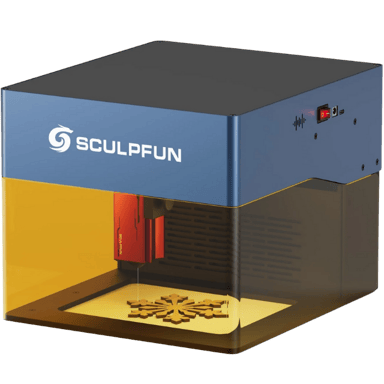
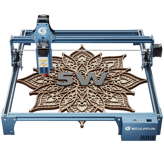
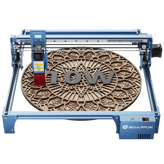
The Sculpfun iCube Pro is a portable desktop laser engraver featuring a 5W laser module designed for precise engraving and cutting on materials like plywood, leather, and acrylic. It includes a built-in smoke filtration system with activated carbon and a filter sponge to maintain a clean workspace by effectively capturing odors and particles.
Specifications & Facts
146
Specs measured. Drama avoided.
Specs, performance, and value — we unpacked the Sculpfun iCube Pro laser engraver & cutter across every angle. See how it stacks up against other laser engravers & cutters.
General Information
9
Sculpfun iCube Pro
Machine Weight
What is the machine weight?
33
lbs
0Votes
Laser Engraver & Cutter in this range
Who knows?
(Help us out by suggesting one!)
Sculpfun iCube Pro
The machine weight is 33 lbs (14.97 kg), making it portable enough for varied workshop environments but stable during operation.
Total weight of the machine.
Don’t keep it to yourself — be the first to react and review the
Machine Weight on Sculpfun iCube Pro
◉ and help others decide!
Sculpfun iCube Pro
Machine Width
What is the machine width?
21.5
inch
0Votes
Laser Engraver & Cutter in this range
Who knows?
(Help us out by suggesting one!)
Sculpfun iCube Pro
The machine width measures 21.5 inch (54.61 cm), offering a sizable footprint suitable for various desktop setups.
Width of the machine footprint.
Don’t keep it to yourself — be the first to react and review the
Machine Width on Sculpfun iCube Pro
◉ and help others decide!
Sculpfun iCube Pro
Machine Depth
What is the machine depth?
17.5
inch
0Votes
Laser Engraver & Cutter in this range
Who knows?
(Help us out by suggesting one!)
Sculpfun iCube Pro
Machine depth is 17.5 inch (44.45 cm), necessary information for planning installation space.
Depth of the machine footprint.
Don’t keep it to yourself — be the first to react and review the
Machine Depth on Sculpfun iCube Pro
◉ and help others decide!
Sculpfun iCube Pro
Machine Height
What is the machine height?
13.7
inch
0Votes
Laser Engraver & Cutter in this range
Who knows?
(Help us out by suggesting one!)
Sculpfun iCube Pro
The machine height is 13.7 inch (34.8 cm), important for workspace accommodation.
Total height of the machine.
Don’t keep it to yourself — be the first to react and review the
Machine Height on Sculpfun iCube Pro
◉ and help others decide!
Sculpfun iCube Pro
Control Method
What is the control method?
0
Sculpfun iCube Pro
0
Votes
Software, Mobile App
Laser Engraver & Cutter in this range
Who knows?
(Help us out by suggesting one!)
Sculpfun iCube Pro
The control method is accessible via Software and Mobile App, providing flexibility in operation through multiple device interfaces.
Defines how the user operates the machine.
Don’t keep it to yourself — be the first to react and review the
Control Method on Sculpfun iCube Pro
◉ and help others decide!
Sculpfun iCube Pro
Intended Use Cases
What are the intended use cases?
0
Sculpfun iCube Pro
0
Votes
Hobby, Professional, Industrial, Education
Laser Engraver & Cutter in this range
Who knows?
(Help us out by suggesting one!)
Describes user applications.
Don’t keep it to yourself — be the first to react and review the
Intended Use Cases on Sculpfun iCube Pro
◉ and help others decide!
Sculpfun iCube Pro
Supported Operating Systems
Which operating systems are supported?
0
Sculpfun iCube Pro
0
Votes
Windows, macOS, Linux
Laser Engraver & Cutter in this range
Who knows?
(Help us out by suggesting one!)
Indicates OS compatibility for controlling software.
Don’t keep it to yourself — be the first to react and review the
Supported Operating Systems on Sculpfun iCube Pro
◉ and help others decide!
Sculpfun iCube Pro
Product Type
What is the product type?
0
Sculpfun iCube Pro
0
Votes
Laser Engraver Cutter
Laser Engraver & Cutter in this range
Who knows?
(Help us out by suggesting one!)
Defines the category of the machine.
Don’t keep it to yourself — be the first to react and review the
Product Type on Sculpfun iCube Pro
◉ and help others decide!
Sculpfun iCube Pro
Frame Type
What is the frame type?
0
Sculpfun iCube Pro
0
Votes
Enclosed
Laser Engraver & Cutter in this range
Who knows?
(Help us out by suggesting one!)
Describes structural design of the machine.
Don’t keep it to yourself — be the first to react and review the
Frame Type on Sculpfun iCube Pro
◉ and help others decide!
Laser Module
13
Sculpfun iCube Pro
Laser Classification
What is the laser classification?
0
Sculpfun iCube Pro
0
Votes
Class 4
Laser Engraver & Cutter in this range
Who knows?
(Help us out by suggesting one!)
Sculpfun iCube Pro
This laser is classified as Class 4, meaning it is powerful and requires appropriate safety measures to prevent eye or skin exposure.
Indicates safety classification based on laser standards.
Don’t keep it to yourself — be the first to react and review the
Laser Classification on Sculpfun iCube Pro
◉ and help others decide!
Sculpfun iCube Pro
Laser Wavelength
What is the laser wavelength?
455
nm
0Votes
Laser Engraver & Cutter in this range
Who knows?
(Help us out by suggesting one!)
Sculpfun iCube Pro
A laser wavelength of 455 nm corresponds to a blue diode laser, typical for precision engraving on various materials.
Defines the wavelength of the emitted laser light.
Don’t keep it to yourself — be the first to react and review the
Laser Wavelength on Sculpfun iCube Pro
◉ and help others decide!
Sculpfun iCube Pro
Laser Power Optical
What is the optical laser power?
5
Watt
0Votes
Laser Engraver & Cutter in this range
Who knows?
(Help us out by suggesting one!)
Sculpfun iCube Pro
The laser optical power is 5 Watt, defining the laser's cutting and engraving strength.
The actual cutting/engraving power delivered to materials.
Don’t keep it to yourself — be the first to react and review the
Laser Power Optical on Sculpfun iCube Pro
◉ and help others decide!
Sculpfun iCube Pro
Laser Focal Length
What is the focal length?
1.5
inch
0Votes
Laser Engraver & Cutter in this range
Who knows?
(Help us out by suggesting one!)
Sculpfun iCube Pro
The laser focal length is 1.5 inch (3.81 cm), a critical parameter that influences engraving precision and focus.
Distance from lens to optimal focus point.
Don’t keep it to yourself — be the first to react and review the
Laser Focal Length on Sculpfun iCube Pro
◉ and help others decide!
Sculpfun iCube Pro
Laser Cooling Method
What is the cooling method?
0
Sculpfun iCube Pro
0
Votes
Air Cooling
Laser Engraver & Cutter in this range
Who knows?
(Help us out by suggesting one!)
Sculpfun iCube Pro
Laser cooling is achieved via Air Cooling, which helps maintain optimal operating temperature without complex cooling infrastructure.
Defines how the laser dissipates heat.
Don’t keep it to yourself — be the first to react and review the
Laser Cooling Method on Sculpfun iCube Pro
◉ and help others decide!
Sculpfun iCube Pro
Laser Type
What is the laser type?
0
Sculpfun iCube Pro
0
Votes
Diode
Laser Engraver & Cutter in this range
Who knows?
(Help us out by suggesting one!)
Indicates the type of laser module used.
Don’t keep it to yourself — be the first to react and review the
Laser Type on Sculpfun iCube Pro
◉ and help others decide!
Sculpfun iCube Pro
Laser Spot Size
What is the laser spot size?
0
Sculpfun iCube Pro
0
Votes
0.06 mm
Laser Engraver & Cutter in this range
Who knows?
(Help us out by suggesting one!)
Defines the diameter of the focused laser spot.
Don’t keep it to yourself — be the first to react and review the
Laser Spot Size on Sculpfun iCube Pro
◉ and help others decide!
Sculpfun iCube Pro
Laser Power Electrical Input
What is the electrical input power?
40
Watt
0Votes
Laser Engraver & Cutter in this range
Who knows?
(Help us out by suggesting one!)
Electrical input power needed to drive the laser.
Don’t keep it to yourself — be the first to react and review the
Laser Power Electrical Input on Sculpfun iCube Pro
◉ and help others decide!
Sculpfun iCube Pro
Adjustable Focus
Does it have adjustable focus?
Yes
0Votes
Sculpfun iCube Pro
Laser Engraver & Cutter in this range
Who knows?
(Help us out by suggesting one!)
Allows manual adjustment of laser focusing height.
Don’t keep it to yourself — be the first to react and review the
Adjustable Focus on Sculpfun iCube Pro
◉ and help others decide!
Sculpfun iCube Pro
Autofocus
Does it support autofocus?
No
0Votes
Sculpfun iCube Pro
Laser Engraver & Cutter in this range
Who knows?
(Help us out by suggesting one!)
Automatically adjusts focus for optimal performance.
Don’t keep it to yourself — be the first to react and review the
Autofocus on Sculpfun iCube Pro
◉ and help others decide!
Sculpfun iCube Pro
Beam Quality
What is the beam quality?
0
Sculpfun iCube Pro
0
Votes
Medium
Laser Engraver & Cutter in this range
Who knows?
(Help us out by suggesting one!)
Describes the uniformity and stability of the beam.
Don’t keep it to yourself — be the first to react and review the
Beam Quality on Sculpfun iCube Pro
◉ and help others decide!
Sculpfun iCube Pro
Laser Replaceability
Is the laser replaceable?
Yes
0Votes
Sculpfun iCube Pro
Laser Engraver & Cutter in this range
Who knows?
(Help us out by suggesting one!)
Indicates whether the laser module can be replaced.
Don’t keep it to yourself — be the first to react and review the
Laser Replaceability on Sculpfun iCube Pro
◉ and help others decide!
Sculpfun iCube Pro
Laser Upgrade Compatibility
Is the laser upgrade-compatible?
No
0Votes
Sculpfun iCube Pro
Laser Engraver & Cutter in this range
Who knows?
(Help us out by suggesting one!)
Allows upgrading to higher-power modules.
Don’t keep it to yourself — be the first to react and review the
Laser Upgrade Compatibility on Sculpfun iCube Pro
◉ and help others decide!
Performance & Capabilities
6
Sculpfun iCube Pro
Supported Resolution DPI
What is the supported DPI?
393.7
DPI
0Votes
Laser Engraver & Cutter in this range
Who knows?
(Help us out by suggesting one!)
Sculpfun iCube Pro
Supported print resolution of 393.7 DPI ensures detailed and sharp engraving results.
Maximum engraving resolution measured in DPI.
Don’t keep it to yourself — be the first to react and review the
Supported Resolution DPI on Sculpfun iCube Pro
◉ and help others decide!
Sculpfun iCube Pro
Real Time Preview Capability
Does it have real-time preview?
Yes
0Votes
Sculpfun iCube Pro
Laser Engraver & Cutter in this range
Who knows?
(Help us out by suggesting one!)
Sculpfun iCube Pro
Real Time Preview Capability lets users view alignment and progress live to reduce errors before and during engraving.
Provides live preview of engraving position.
Don’t keep it to yourself — be the first to react and review the
Real Time Preview Capability on Sculpfun iCube Pro
◉ and help others decide!
Sculpfun iCube Pro
Pass Through Operation
Does it support pass-through operation?
No
0Votes
Sculpfun iCube Pro
Laser Engraver & Cutter in this range
Who knows?
(Help us out by suggesting one!)
Allows long materials to pass through the machine for oversized work.
Don’t keep it to yourself — be the first to react and review the
Pass Through Operation on Sculpfun iCube Pro
◉ and help others decide!
Sculpfun iCube Pro
Flame Detection
Does it have flame detection?
No
0Votes
Sculpfun iCube Pro
Laser Engraver & Cutter in this range
Who knows?
(Help us out by suggesting one!)
System detects flame formation during cutting.
Don’t keep it to yourself — be the first to react and review the
Flame Detection on Sculpfun iCube Pro
◉ and help others decide!
Sculpfun iCube Pro
Tilt Detection
Does it include tilt detection?
Yes
0Votes
Sculpfun iCube Pro
Laser Engraver & Cutter in this range
Who knows?
(Help us out by suggesting one!)
Detects tilting or instability to prevent accidents.
Don’t keep it to yourself — be the first to react and review the
Tilt Detection on Sculpfun iCube Pro
◉ and help others decide!
Sculpfun iCube Pro
Vibration Compensation
Does it have vibration compensation?
Yes
0Votes
Sculpfun iCube Pro
Laser Engraver & Cutter in this range
Who knows?
(Help us out by suggesting one!)
System that stabilizes engraving against vibrations.
Don’t keep it to yourself — be the first to react and review the
Vibration Compensation on Sculpfun iCube Pro
◉ and help others decide!
Work Area
11
Sculpfun iCube Pro
Work Area Width
What is the work area width?
21.5
inch
0Votes
Laser Engraver & Cutter in this range
Who knows?
(Help us out by suggesting one!)
Sculpfun iCube Pro
Work area width is 21.5 inch (54.61 cm), allowing for medium-sized materials to be accommodated comfortably.
The usable horizontal workspace width.
Don’t keep it to yourself — be the first to react and review the
Work Area Width on Sculpfun iCube Pro
◉ and help others decide!
Sculpfun iCube Pro
Work Area Depth
What is the work area depth?
19.7
inch
0Votes
Laser Engraver & Cutter in this range
Who knows?
(Help us out by suggesting one!)
Sculpfun iCube Pro
Work area depth measures 19.7 inch (50.04 cm), defining the maximum length for material placement.
The usable horizontal workspace depth.
Don’t keep it to yourself — be the first to react and review the
Work Area Depth on Sculpfun iCube Pro
◉ and help others decide!
Sculpfun iCube Pro
Work Surface Type
What is the work surface type?
0
Sculpfun iCube Pro
0
Votes
Solid Plate
Laser Engraver & Cutter in this range
Who knows?
(Help us out by suggesting one!)
Sculpfun iCube Pro
The work surface type is a Solid Plate, which provides a sturdy base for workpieces but may be less effective for debris ventilation compared to honeycomb beds.
Describes the type of workspace material sits on.
Don’t keep it to yourself — be the first to react and review the
Work Surface Type on Sculpfun iCube Pro
◉ and help others decide!
Sculpfun iCube Pro
Work Area Height Clearance
What is the height clearance?
3.7
inch
0Votes
Laser Engraver & Cutter in this range
Who knows?
(Help us out by suggesting one!)
Sculpfun iCube Pro
Work area height clearance of 3.7 inch (9.4 cm) limits the maximum thickness of materials that can be engraved or cut without additional risers.
Maximum allowable material height under the laser.
Don’t keep it to yourself — be the first to react and review the
Work Area Height Clearance on Sculpfun iCube Pro
◉ and help others decide!
Sculpfun iCube Pro
Expandable Work Area
Is the work area expandable?
No
0Votes
Sculpfun iCube Pro
Laser Engraver & Cutter in this range
Who knows?
(Help us out by suggesting one!)
Indicates if the workspace can be expanded with extensions.
Don’t keep it to yourself — be the first to react and review the
Expandable Work Area on Sculpfun iCube Pro
◉ and help others decide!
Sculpfun iCube Pro
Work Style
What is the work style?
0
Sculpfun iCube Pro
0
Votes
Enclosed
Laser Engraver & Cutter in this range
Who knows?
(Help us out by suggesting one!)
Indicates whether the device operates in open air or inside a chamber.
Don’t keep it to yourself — be the first to react and review the
Work Style on Sculpfun iCube Pro
◉ and help others decide!
Sculpfun iCube Pro
Rotary Engraving
Does it support rotary engraving?
No
0Votes
Sculpfun iCube Pro
Laser Engraver & Cutter in this range
Who knows?
(Help us out by suggesting one!)
Indicates support for rotary modules for cylindrical engraving.
Don’t keep it to yourself — be the first to react and review the
Rotary Engraving on Sculpfun iCube Pro
◉ and help others decide!
Sculpfun iCube Pro
Honeycomb Bed
Is a honeycomb bed included?
No
0Votes
Sculpfun iCube Pro
Laser Engraver & Cutter in this range
Who knows?
(Help us out by suggesting one!)
Indicates whether a honeycomb bed is included for airflow and cut quality.
Don’t keep it to yourself — be the first to react and review the
Honeycomb Bed on Sculpfun iCube Pro
◉ and help others decide!
Sculpfun iCube Pro
Removable Base
Does it have a removable base?
No
0Votes
Sculpfun iCube Pro
Laser Engraver & Cutter in this range
Who knows?
(Help us out by suggesting one!)
Allows the bottom panel to be removed for large or tall objects.
Don’t keep it to yourself — be the first to react and review the
Removable Base on Sculpfun iCube Pro
◉ and help others decide!
Sculpfun iCube Pro
Grid Marking Reference
Does it have grid markings?
No
0Votes
Sculpfun iCube Pro
Laser Engraver & Cutter in this range
Who knows?
(Help us out by suggesting one!)
Indicates whether the workspace has grid lines for alignment.
Don’t keep it to yourself — be the first to react and review the
Grid Marking Reference on Sculpfun iCube Pro
◉ and help others decide!
Sculpfun iCube Pro
Bed Leveling Method
What is the bed leveling method?
0
Sculpfun iCube Pro
0
Votes
Manual
Laser Engraver & Cutter in this range
Who knows?
(Help us out by suggesting one!)
Shows how the work bed is leveled for consistency.
Don’t keep it to yourself — be the first to react and review the
Bed Leveling Method on Sculpfun iCube Pro
◉ and help others decide!
Material Compatibility
16
Sculpfun iCube Pro
Leather Engraving
Can it engrave leather?
Yes
0Votes
Sculpfun iCube Pro
Laser Engraver & Cutter in this range
Who knows?
(Help us out by suggesting one!)
Sculpfun iCube Pro
The machine supports leather engraving, expanding its capabilities to work with various types of leather materials.
Ability to engrave leather materials.
Don’t keep it to yourself — be the first to react and review the
Leather Engraving on Sculpfun iCube Pro
◉ and help others decide!
Sculpfun iCube Pro
Metal Engraving Coated Anodized
Can it engrave coated or anodized metal?
Yes
0Votes
Sculpfun iCube Pro
Laser Engraver & Cutter in this range
Who knows?
(Help us out by suggesting one!)
Sculpfun iCube Pro
The ability to engrave metal that is coated and anodized expands the machine's application possibilities for various metal-based projects.
Ability to engrave coated or anodized metals.
Don’t keep it to yourself — be the first to react and review the
Metal Engraving Coated Anodized on Sculpfun iCube Pro
◉ and help others decide!
Sculpfun iCube Pro
Wood Engraving Capability
Can it engrave wood?
Yes
0Votes
Sculpfun iCube Pro
Laser Engraver & Cutter in this range
Who knows?
(Help us out by suggesting one!)
Ability to engrave various types of wood.
Don’t keep it to yourself — be the first to react and review the
Wood Engraving Capability on Sculpfun iCube Pro
◉ and help others decide!
Sculpfun iCube Pro
Wood Cutting Capability
Can it cut wood?
Yes
0Votes
Sculpfun iCube Pro
Laser Engraver & Cutter in this range
Who knows?
(Help us out by suggesting one!)
Ability to cut through wood materials.
Don’t keep it to yourself — be the first to react and review the
Wood Cutting Capability on Sculpfun iCube Pro
◉ and help others decide!
Sculpfun iCube Pro
Acrylic Engraving
Can it engrave acrylic?
Yes
0Votes
Sculpfun iCube Pro
Laser Engraver & Cutter in this range
Who knows?
(Help us out by suggesting one!)
Ability to engrave acrylic surfaces.
Don’t keep it to yourself — be the first to react and review the
Acrylic Engraving on Sculpfun iCube Pro
◉ and help others decide!
Sculpfun iCube Pro
Acrylic Cutting
Can it cut acrylic?
Yes
0Votes
Sculpfun iCube Pro
Laser Engraver & Cutter in this range
Who knows?
(Help us out by suggesting one!)
Ability to cut acrylic sheets.
Don’t keep it to yourself — be the first to react and review the
Acrylic Cutting on Sculpfun iCube Pro
◉ and help others decide!
Sculpfun iCube Pro
Leather Cutting
Can it cut leather?
Yes
0Votes
Sculpfun iCube Pro
Laser Engraver & Cutter in this range
Who knows?
(Help us out by suggesting one!)
Ability to cut leather materials.
Don’t keep it to yourself — be the first to react and review the
Leather Cutting on Sculpfun iCube Pro
◉ and help others decide!
Sculpfun iCube Pro
Fabric Engraving
Can it engrave fabric?
Yes
0Votes
Sculpfun iCube Pro
Laser Engraver & Cutter in this range
Who knows?
(Help us out by suggesting one!)
Ability to engrave textiles.
Don’t keep it to yourself — be the first to react and review the
Fabric Engraving on Sculpfun iCube Pro
◉ and help others decide!
Sculpfun iCube Pro
Fabric Cutting
Can it cut fabric?
Yes
0Votes
Sculpfun iCube Pro
Laser Engraver & Cutter in this range
Who knows?
(Help us out by suggesting one!)
Ability to cut textile materials.
Don’t keep it to yourself — be the first to react and review the
Fabric Cutting on Sculpfun iCube Pro
◉ and help others decide!
Sculpfun iCube Pro
Rubber Engraving
Can it engrave rubber?
Yes
0Votes
Sculpfun iCube Pro
Laser Engraver & Cutter in this range
Who knows?
(Help us out by suggesting one!)
Ability to engrave rubber materials.
Don’t keep it to yourself — be the first to react and review the
Rubber Engraving on Sculpfun iCube Pro
◉ and help others decide!
Sculpfun iCube Pro
Metal Engraving Bare
Can it engrave bare metal?
No
0Votes
Sculpfun iCube Pro
Laser Engraver & Cutter in this range
Who knows?
(Help us out by suggesting one!)
Ability to engrave untreated/bare metal.
Don’t keep it to yourself — be the first to react and review the
Metal Engraving Bare on Sculpfun iCube Pro
◉ and help others decide!
Sculpfun iCube Pro
Metal Cutting Assisted
Can it cut metal with assistance?
No
0Votes
Sculpfun iCube Pro
Laser Engraver & Cutter in this range
Who knows?
(Help us out by suggesting one!)
Ability to cut metal using assisted methods (air/oxygen).
Don’t keep it to yourself — be the first to react and review the
Metal Cutting Assisted on Sculpfun iCube Pro
◉ and help others decide!
Sculpfun iCube Pro
Glass Engraving
Can it engrave glass?
Yes
0Votes
Sculpfun iCube Pro
Laser Engraver & Cutter in this range
Who knows?
(Help us out by suggesting one!)
Ability to engrave glass surfaces.
Don’t keep it to yourself — be the first to react and review the
Glass Engraving on Sculpfun iCube Pro
◉ and help others decide!
Sculpfun iCube Pro
Stone Engraving
Can it engrave stone?
Yes
0Votes
Sculpfun iCube Pro
Laser Engraver & Cutter in this range
Who knows?
(Help us out by suggesting one!)
Ability to engrave stone surfaces.
Don’t keep it to yourself — be the first to react and review the
Stone Engraving on Sculpfun iCube Pro
◉ and help others decide!
Sculpfun iCube Pro
Ceramic Engraving
Can it engrave ceramic?
Yes
0Votes
Sculpfun iCube Pro
Laser Engraver & Cutter in this range
Who knows?
(Help us out by suggesting one!)
Ability to engrave ceramic materials.
Don’t keep it to yourself — be the first to react and review the
Ceramic Engraving on Sculpfun iCube Pro
◉ and help others decide!
Sculpfun iCube Pro
Food Engraving
Can it engrave food?
Yes
0Votes
Sculpfun iCube Pro
Laser Engraver & Cutter in this range
Who knows?
(Help us out by suggesting one!)
Ability to engrave edible items.
Don’t keep it to yourself — be the first to react and review the
Food Engraving on Sculpfun iCube Pro
◉ and help others decide!
 Supermod
 Moderator